When you start searching for solutions, you find hundreds of risky apps that promise fast unlocking but either don’t work or steal your data.That’s exactly why you need a trusted FRP bypass tool instead of random tricks from the internet.
In this article, we will see 4 safe and tested tools so you can unlock your device without damaging it, risking your privacy, or installing malware. Let’s make the FRP unlock process simple, safe, and stress‑free for you.
Table of Contents
What Really Happens When FRP Locks Your Phone?
After a reset, your phone checks you are the right owner of the phone or not.If you can’t prove it, the phone won’t let you in. This means all your apps, settings, and personal data stay protected — but it also leaves you stuck if you forget your account or buy a second-hand phone.
NOTE:Google FRP (Factory Reset Protection) first appeared in Android 5.1 Lollipop on March 9, 2015. It’s key security feature designed to prevent stolen or lost phones from being reset and accessed by anyone who isn’t the owner.
But wait — not every tool is safe.
What Problems Do Most People Face?
Most websites promising remove frp lock or “free Samsung unlock” are risky.They can Steal your personal data, Break your phone. Install malware ,Lock your device forever.
If you are in India, this is super common:
✔ You bought a second-hand phone.
✔ You don’t remember your Gmail password
✔ You reset your device before deleting the Google account
✔ A repair shop gave you a locked phone
✔ You need remove google frp lock free help
Which FRP Tools Are Actually Safe to Use?
I tested and studied every popular tool — and these 4 tools are trusted across India.
They don’t steal data. They don’t inject malware. And they actually work.
1.FRP Bypass (Simple & Trusted)
This is one of the oldest and cleanest ways to remove frp lock in android devices. When you need quick bypass frp removal, this tool gets the job done.
Why it’s good:
- Works on many phones
- Easy steps
- Clean interface
- Low risk
It’s great when you just want a simple frp removal without headache.
2.VNROM (Super Quick & Popular in India)
You’ve probably heard the name vnrom.vnrom frp everywhere and for a reason.if you see complete step by step guide you can checkout vnrom activity launcher
It helps users:
- Skip Google sign-in
- Do bypass frp on many models
- Finish the unlock under 5–10 minutes
But remember:
Always download from the official site — because fake copies exist.
3.AddROM Bypass (Fast & Reliable)
Addrom bypass is a favourite for Samsung device, Oppo, Vivo, Xiaomi users.
It helps you open settings even when your phone is locked. This is very useful when you need to change small things before unlock.
It helps you:
- Do frp unlock
- Open settings quickly
- Add a new account
- Skip verification
Works great if your phone supports browser opening during FRP.can can read complete guide for
4.Android Multi Tools (For Tech-Savvy Users)
This tool is powerful tool .If you know basics of phone software, android multi tools you need
- USB drivers
- ADB
- Phone commands
Best for users who want extra control.

What About FRP Unlock by IMEI?
Some people try unlock frp with imei free websites.
But be careful.
Most sites promising IMEI unlock are:
❌ Fake
❌ Unsafe
❌ Data-stealing
If you want to be safe — avoid IMEI unlocks unless done by official brand support.
Which FRP Tool Should You Use?
| Brand | Supported Models | Android Versions Seen in FRP Cases | Common FRP Bypass Methods Used |
| Samsung | Galaxy A03s, Samsung A13, Galaxy S20 FE 5G, and many A / M / S series phones | Android 10, 11, 12, and even newer versions like Android 14 on some models | SamFW-style tools, Muslim Odin (for older Android versions), TalkBack tricks, ADB/QR code tricks, and on some phones flashing or downgrade when the binary allows |
| Oppo | Works for Oppo phones including Reno, A-series, Find-series, older ColorOS models like Oppo R17 too | From older Android builds up to newer ColorOS versions (Android 8 to Android 13+) | Multi Tool FRP reset, TalkBack bypass tricks, and for advanced users EDL/ADB/flash-based unlock depending on chipset |
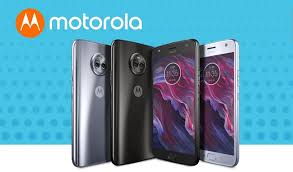
| Motorola | Motorola | Several Motorola phones on different Android versions (not publicly listed model by model) | Multi Tool FRP reset, ADB or Fastboot tricks where bootloader state allows |
| Vivo | All Vivo Y-Series(Y11/15/20/21)V-Series(V11/15/17/19) phones are supported because the brand works well with repair tools . | Many Vivo phones across different Android versions (varies by model) | Android Multi Tool, TalkBack + browser tricks, ADB-based methods depending on phone and patch level |
Is Bypass FRP lock 2.0 APK Safe?
Yes, the frp bypass 2.0 apk is a known tool.But ONLY download from trusted sources.
Fake versions often include malware.
How Do You Avoid FRP Lock Next Time?
One small step can save hours of stress.Here’s what most of people forget:
✔ Remove your Google account credentials before resetting
✔ Save your Gmail password
✔ Turn off screen lock before hard reset
✔ Don’t reset second-hand phones immediately
Final Thoughts
I know how painful FRP can be.
When your phone is locked, it feels like your world stops.
But with the right frp removal method and the right frp bypass tool, you can unlock safely — without fear, without malware, and without paying for shady services.
And if your friend ever gets locked out, they won’t google “frp unlock”… again