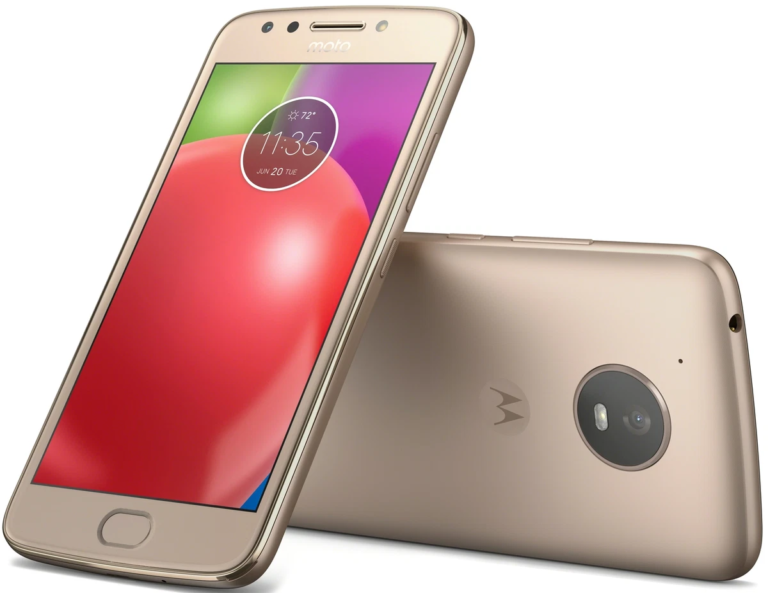
Motorola Moto G5S Plus, or XT1800, XT1802, and XT1805 variants, are inexpensive Android smartphones popular among users. Stock ROMs and firmware, for instances, when users want to update or restore their devices, are crucial in making sure the software in the mobile device is functional. In case you are interested in stock ROM/firmware for various geographic locations and models to update or downgrade your Motorola Moto G5S Plus, here is a dependable compilation.
Why Should You Download Stock ROM for Motorola Moto G5S Plus?
Understanding what stock ROMs are and why you would need Motorola Moto G5S Plus stock ROMs is necessary before you jump ahead to available firmware versions. Stock ROMs are versions of firmware that are originally developed and released by manufacturers. Sometimes users need to download/install stock ROMs for the following reasons:
- HELP FIX SOFTWARE PROBLEMS: Software problems like constant lagging, crashing, or anything else can be fixed by restoring the stock firmware.
- HELP UNBRICK A DEVICE: If your phone freezes and won’t respond, or even if it’s stuck in an interrupted update, sometimes you can fix it by flashing the stock ROM.
- HELP RESTORE A DEVICE TO FACTORY SETTINGS: If you are selling your phone (or giving it away), the stock firmware can help erase all of your personal information.
- HELP GET THE LATEST UPDATES: Updates are sometimes provided by manufacturers. These updates help install new features and improve security. Keeping your phone’s stock ROM up to date is necessary to keep the phone current.
Step by Step Instructions on Installing the Stock ROM on Motorola Moto G5S Plus
If you want to install stock rom, you need some technical skills. Some simple steps include:
- Backup Existing Data: Data on the device may be erasesd. So it’s important to backup your data.
- Bootloader Needs to be Unlocked: In order to flash stock rom in your Motorola device, you need to have your Bootloader unlocked first. To unlock the bootloader you can go to Motorola’s website to follow instructions on that.
- Download the Right ROM: Motorola Moto G5S Plus has different firmwares for different model numbers (XT1800, XT1802, XT1805) as well as for different carriers and regions. Rogers and Fido have different stock ROMs. So be sure to download the right one.
- Install the ADB and Fastboot: These need to be downloaded as they will help in flashing the ROM. ADB and fastboot can be downloaded on your computer through some basic commands.
- Boot to Fastboot: Shut down your phone. Once it is off, press Volume Down and the Power button to boot into Fastboot.
- Flash the ROM: Go to your command prompt (if you’re using Windows) or terminal (if you’re using macOS or Linux) and type the commands to flash the ROM to the device. Depending on your device and the stock ROM, commands will be different.
DOWNLOAD:
RETUS:
- XT1806_SANDERS_RETUS_8.1.0_OPSS28.65-36-11-4_cid50_subsidy-DEFAULT_regulatory-DEFAULT_CFC.xml.zip
- XT1806_SANDERS_RETUS_8.1.0_OPS28.65-36-14_cid50_subsidy-DEFAULT_regulatory-DEFAULT_CFC.xml.zip
- XT1806_SANDERS_RETUS_8.1.0_OPS28.65-36-11_cid50_subsidy-DEFAULT_regulatory-DEFAULT_CFC.xml.zip
RETID:
- XT1805_SANDERS_RETID_8.1.0_OPSS28.65-36-11-4_cid50_subsidy-DEFAULT_regulatory-DEFAULT_CFC.xml.zip
- XT1805_SANDERS_RETID_8.1.0_OPSS28.65-36-9_cid50_subsidy-DEFAULT_regulatory-DEFAULT_CFC.xml.zip
- XT1805_SANDERS_RETID_8.1.0_OPSS28.65-36-6_cid50_subsidy-DEFAULT_regulatory-DEFAULT_CFC.xml.zip
- XT1805_SANDERS_RETID_8.1.0_OPS28.65-36-11_cid50_subsidy-DEFAULT_regulatory-DEFAULT_CFC.xml.zip
- XT1805_SANDERS_RETID_8.1.0_OPS28.65-36_cid50_subsidy-DEFAULT_regulatory-DEFAULT_CFC.xml.zip
RETEU:
- XT1805_SANDERS_RETEU_DS_8.1.0_OPSS28.65-36-11-4_cid50_subsidy-DEFAULT_regulatory-DEFAULT_CFC.xml.zip
- XT1805_SANDERS_RETEU_DS_8.1.0_OPS28.65-36-14_cid50_subsidy-DEFAULT_regulatory-DEFAULT_CFC.xml.zip
RETIN :
- XT1804_SANDERS_RETIN_8.1.0_OPSS28.65-36-11-4_cid50_subsidy-DEFAULT_regulatory-DEFAULT_CFC.xml.zip
- XT1804_SANDERS_RETIN_8.1.0_OPS28.65-36-14_cid50_subsidy-DEFAULT_regulatory-DEFAULT_CFC.xml.zip
RETEU:
- XT1803_SANDERS_RETEU_SS_8.1.0_OPSS28.65-36-11-4_cid50_subsidy-DEFAULT_regulatory-DEFAULT_CFC.xml.zip
- XT1803_SANDERS_RETEU_SS_8.1.0_OPS28.65-36-14_cid50_subsidy-DEFAULT_regulatory-DEFAULT_CFC.xml.zip
RETLA:
- XT1801_SANDERS_RETLA_8.1.0_OPSS28.65-36-11-4_cid50_subsidy-DEFAULT_regulatory-DEFAULT_CFC.xml.zip
- XT1801_SANDERS_RETLA_8.1.0_OPS28.65-36-14_cid50_subsidy-DEFAULT_regulatory-DEFAULT_CFC.xml.zip
RETCL:
- XT1800_SANDERS_RETCL_8.1.0_OPSS28.65-36-11-4_cid50_subsidy-DEFAULT_regulatory-DEFAULT_CFC.xml.zip
- XT1800_SANDERS_RETCL_8.1.0_OPS28.65-36-14_cid50_subsidy-DEFAULT_regulatory-DEFAULT_CFC.xml.zip
RETAIL:
- SANDERS_RETAIL_8.1.0_OPSS28.65-36-11-4_cid50_subsidy-DEFAULT_regulatory-DEFAULT_CFC.xml.zip
- SANDERS_RETAIL_8.1.0_OPSS28.65-36-9_cid50_subsidy-DEFAULT_regulatory-DEFAULT_CFC.xml.zip
- SANDERS_RETAIL_8.1.0_OPSS28.65-36-6_cid50_subsidy-DEFAULT_regulatory-DEFAULT_CFC.xml.zip
- SANDERS_RETAIL_8.1.0_OPSS28.65-36-3_cid50_subsidy-DEFAULT_regulatory-DEFAULT_CFC.xml.zip
- SANDERS_RETAIL_8.1.0_OPS28.65-36-14_cid50_subsidy-DEFAULT_regulatory-DEFAULT_CFC.xml.zip
- SANDERS_RETAIL_8.1.0_OPS28.65-36-11_cid50_subsidy-DEFAULT_regulatory-DEFAULT_CFC.xml.zip
- SANDERS_RETAIL_8.1.0_OPS28.65-36_cid50_subsidy-DEFAULT_regulatory-DEFAULT_CFC.xml.zip
- SANDERS_RETAIL_7.1.1_NPSS26.116-64-11_cid50_subsidy-DEFAULT_regulatory-DEFAULT_CFC.xml.zip
- SANDERS_RETAIL_7.1.1_NPSS26.116-64-8_cid50_subsidy-DEFAULT_regulatory-DEFAULT_CFC.xml.zip
- SANDERS_RETAIL_7.1.1_NPSS26.116-64-5_cid50_subsidy-DEFAULT_regulatory-DEFAULT_CFC.xml.zip
- SANDERS_RETAIL_7.1.1_NPSS26.116-64-2_cid50_subsidy-DEFAULT_regulatory-DEFAULT_CFC.xml.zip
- SANDERS_RETAIL_7.1.1_NPSS26.116-45-17_cid50_subsidy-DEFAULT_regulatory-DEFAULT_CFC.xml.zip
- SANDERS_RETAIL_7.1.1_NPSS26.116-45-5_cid50_subsidy-DEFAULT_regulatory-DEFAULT_CFC.xml.zip
- SANDERS_RETAIL_7.1.1_NPS26.116-45_cid50_subsidy-DEFAULT_regulatory-DEFAULT_CFC.xml.zip
RETAPAC:
- XT1805_SANDERS_RETAPAC_8.1.0_OPSS28.65-36-11-4_cid50_subsidy-DEFAULT_regulatory-DEFAULT_CFC.xml.zip
- XT1805_SANDERS_RETAPAC_8.1.0_OPS28.65-36-14_cid50_subsidy-DEFAULT_regulatory-DEFAULT_CFC.xml.zip
PLAYPL:
- XT1805_SANDERS_PLAYPL_8.1.0_OPSS28.65-36-11-4_cid50_subsidy-DEFAULT_regulatory-DEFAULT_CFC.xml.zip
- XT1805_SANDERS_PLAYPL_8.1.0_OPSS28.65-36-9_cid50_subsidy-DEFAULT_regulatory-DEFAULT_CFC.xml.zip
- XT1805_SANDERS_PLAYPL_8.1.0_OPSS28.65-36-6_cid50_subsidy-DEFAULT_regulatory-DEFAULT_CFC.xml.zip
- XT1805_SANDERS_PLAYPL_8.1.0_OPSS28.65-36-3_cid50_subsidy-DEFAULT_regulatory-DEFAULT_CFC.xml.zip
- XT1805_SANDERS_PLAYPL_8.1.0_OPS28.65-36-14_cid50_subsidy-DEFAULT_regulatory-DEFAULT_CFC.xml.zip
- XT1805_SANDERS_PLAYPL_8.1.0_OPS28.65-36-11_cid50_subsidy-DEFAULT_regulatory-DEFAULT_CFC.xml.zip
- XT1805_SANDERS_PLAYPL_8.1.0_OPS28.65-36_cid50_subsidy-DEFAULT_regulatory-DEFAULT_CFC.xml.zip
- XT1805_SANDERS_PLAYPL_7.1.1_NPSS26.116-42-18_cid50_subsidy-DEFAULT_regulatory-DEFAULT_CFC.xml.zip
RETAPAC:
- XT1803_SANDERS_RETAPAC_8.1.0_OPSS28.65-36-11-4_cid50_subsidy-DEFAULT_regulatory-DEFAULT_CFC.xml.zip
- XT1803_SANDERS_RETAPAC_8.1.0_OPS28.65-36-14_cid50_subsidy-DEFAULT_regulatory-DEFAULT_CFC.xml.zip
RETBR:
- XT1802_SANDERS_RETBR_8.1.0_OPSS28.65-36-11-4_cid50_subsidy-DEFAULT_regulatory-DEFAULT_CFC.xml.zip
- XT1802_SANDERS_RETBR_8.1.0_OPS28.65-36-14_cid50_subsidy-DEFAULT_regulatory-DEFAULT_CFC.xml.zip
OPENMX:
- XT1800_SANDERS_OPENMX_8.1.0_OPSS28.65-36-11-4_cid50_subsidy-DEFAULT_regulatory-DEFAULT_CFC.xml.zip
- XT1800_SANDERS_OPENMX_8.1.0_OPS28.65-36-14_cid50_subsidy-DEFAULT_regulatory-DEFAULT_CFC.xml.zip
Final Thought
We hope to have provided you with the necessary information related to your stock ROMs and Firmware for your Motorola Moto G5S Plus (XT1800, XT1802, XT1805). We understand that you may want to address issues with your system, update to the latest available Android, or simply return your device to a factory state.
Also, please ensure you are choosing the correct ROM for your model and region. Please remember to perform a backup of your device prior to performing any flash, and always hand select your custom ROM recovery from the stock ROMs depending on the performance you want to achieve. We hope you enjoy your Motorola Moto G5S Plus and the performance that comes from using stock ROMs.
FAQs
What is Stock ROM?
A manufacturer provides Stock ROM as the first version of the software of the operating system that comes installed on your device. Each phone has a specific version that is most stable and secure.
How do I tell which Stock ROM is right for my Moto G5S Plus?
You will want to obtain the Stock ROM that is for the model of your device, as the Moto G5S Plus comes in multiple versions; XT1800, XT1802, XT1805. The region and carrier also matter (RETUS, RETID, RETEU). Lastly, make sure the version is the same as the one you currently have or the one you want to install.
Can I do an update on my Moto G5S Plus with Stock ROM?
Definitely. Flash the latest Stock ROM update for Moto G5S Plus and you will get the latest features and security patches.
Is installing a Stock ROM on my Moto G5S Plus safe?
In most cases, yes. There are risks when installing a Stock ROM, but as long as you follow the guides, the risks can be minimized. It is also a good way to update to the latest version, reset to factory settings, or to troubleshoot the software.
Will my data be erased with Stock ROM installation?
Yes, it usually does. Flashing Stock ROM is usually accompanied by the erasure of all the data on your device. Important files should be backed up before installation.