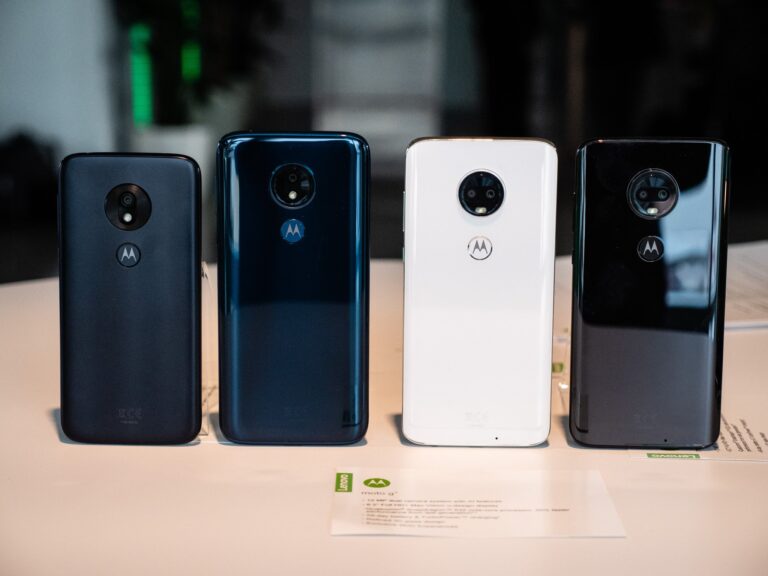
Motorola Moto G5s (XT1793 / XT1794 / XT1797) is another smartphone with such popularity due to the comfortable operation and stylish design. Not only is having the Stock ROM / Firmware in Motorola Moto G5s (XT1793 / XT1794 / XT1797) highly important, but it is also crucial to be a developer or tech enthusiast. Stock ROMs can be used to restore your device to its factory-fresh original condition, eliminate bugs, resolve boot loops, or disable FRP ( Factory Reset Protection).
This guide will offer a full installation package containing all variants of official Motorola Moto G5s firmware, installation guidelines, and tips to a successful flashing procedure.
Reasons Why You Need Stock ROM / Firmware.
Original software that Motorola created on the Moto G5s is called Stock ROM (so it is also called official firmware). The following are the circumstances in which it is necessary to install the appropriate Stock ROM / Firmware on the Motorola Moto G5s (XT1793 / XT1794 /XT1797):
- Repairing boot loops and software crashes.
- Unbricking a dead phone
- Uninstalling viruses or damaged software.
- Breaking FRP lock following a factory reformat
- Upgrading or downgrading of software version.
Warranty, stability and error can be a problem when using unofficial, or custom ROMs. It is, therefore, always advisable to make use of official firmware.
Available Variants
Motorola Moto G5s is available in several variations:
- XT1793 – Single SIM variant
- XT1794 – Dual SIM variant
- XT1797 – Special regional variant
Ensure that you download the right Stock ROM / Firmware of Motorola Moto G5s (XT1793 / XT1794 / XT1797) that fits your model of the device. Installing the incorrect firmware could permanently brick your phone.
How to download Stock ROM / Firmware
The official firmware could be downloaded to the trusted sources, including the official site of Motorola or verified repositories of ROMs. Steps:
DOWNLOAD:
RETAIL:
- MONTANA_RETAIL_8.1.0_OPPS28.65-37-7-6_cid50_subsidy-DEFAULT_regulatory-DEFAULT_CFC.xml.zip
- MONTANA_RETAIL_8.1.0_OPPS28.65-37-7-4_cid50_subsidy-DEFAULT_regulatory-DEFAULT_CFC.xml.zip
- MONTANA_RETAIL_8.1.0_OPPS28.65-37-7-2_cid50_subsidy-DEFAULT_regulatory-DEFAULT_CFC.xml.zip
- MONTANA_RETAIL_8.1.0_OPPS28.65-37-2-5_cid50_subsidy-DEFAULT_regulatory-DEFAULT_CFC.xml.zip
- MONTANA_RETAIL_8.1.0_OPPS28.65-37-2-2_cid50_subsidy-DEFAULT_regulatory-DEFAULT_CFC.xml.zip
- MONTANA_RETAIL_8.1.0_OPP28.65-37-7_cid50_subsidy-DEFAULT_regulatory-DEFAULT_CFC.xml.zip
- MONTANA_RETAIL_8.1.0_OPP28.65-37-2_cid50_subsidy-DEFAULT_regulatory-DEFAULT_CFC.xml.zip
- MONTANA_RETAIL_7.1.1_NPPS26.102-50-8_cid50_subsidy-DEFAULT_regulatory-DEFAULT_CFC.xml.zip
- MONTANA_RETAIL_7.1.1_NPPS26.102-49-14_cid50_subsidy-DEFAULT_regulatory-DEFAULT_CFC.xml.zip
- MONTANA_RETAIL_7.1.1_NPPS26.102-49-11_cid50_subsidy-DEFAULT_regulatory-DEFAULT_CFC.xml.zip
- MONTANA_RETAIL_7.1.1_NPPS26.102-49-8_cid50_subsidy-DEFAULT_regulatory-DEFAULT_CFC.xml.zip
- MONTANA_RETAIL_7.1.1_NPP26.102-49_cid50_subsidy-DEFAULT_regulatory-DEFAULT_CFC.xml.zip
- MONTANA_RETAIL_7.1.1_NPP26.102-16_cid50_subsidy-DEFAULT_regulatory-DEFAULT_CFC.xml.zip
RETAPAC:
- XT1797_MONTANA_RETAPAC_8.1.0_OPPS28.65-37-7-11_cid50_subsidy-DEFAULT_regulatory-DEFAULT_CFC.xml.zip
- XT1797_MONTANA_RETAPAC_8.1.0_OPPS28.65-37-7-6_cid50_subsidy-DEFAULT_regulatory-DEFAULT_CFC.xml.zip
RETGB:
- XT1794_MONTANA_RETGB_DS_8.1.0_OPPS28.65-37-7-11_cid50_subsidy-DEFAULT_regulatory-DEFAULT_CFC.xml.zip
- XT1794_MONTANA_RETGB_DS_8.1.0_OPPS28.65-37-7-6_cid50_subsidy-DEFAULT_regulatory-DEFAULT_CFC.xml.zip
RETEU:
- XT1794_MONTANA_RETEU_DS_8.1.0_OPPS28.65-37-7-11_cid50_subsidy-DEFAULT_regulatory-DEFAULT_CFC.xml.zip
- XT1794_MONTANA_RETEU_DS_8.1.0_OPPS28.65-37-7-6_cid50_subsidy-DEFAULT_regulatory-DEFAULT_CFC.xml.zip
PLAYPL:
- XT1794_MONTANA_PLAYPL_8.1.0_OPPS28.65-37-7-11_cid50_subsidy-DEFAULT_NO_ERASE_MODEMST_CFC.xml.zip
- XT1794_MONTANA_PLAYPL_8.1.0_OPPS28.65-37-7-6_cid50_subsidy-DEFAULT_regulatory-DEFAULT_CFC.xml.zip
- XT1794_MONTANA_PLAYPL_8.1.0_OPPS28.65-37-7-4_cid50_subsidy-DEFAULT_regulatory-DEFAULT_CFC.xml.zip
- XT1794_MONTANA_PLAYPL_8.1.0_OPPS28.65-37-7-2_cid50_subsidy-DEFAULT_regulatory-DEFAULT_CFC.xml.zip
- XT1794_MONTANA_PLAYPL_8.1.0_OPPS28.65-37-5_cid50_subsidy-DEFAULT_regulatory-DEFAULT_CFC.xml.zip
- XT1794_MONTANA_PLAYPL_8.1.0_OPPS28.65-37-2_cid50_subsidy-DEFAULT_regulatory-DEFAULT_CFC.xml.zip
- XT1794_MONTANA_PLAYPL_8.1.0_OPP28.65-37-7_cid50_subsidy-DEFAULT_regulatory-DEFAULT_CFC.xml.zip
- XT1794_MONTANA_PLAYPL_8.1.0_OPP28.65-37_cid50_subsidy-DEFAULT_regulatory-DEFAULT_CFC.xml.zip
RETEU:
- XT1793_MONTANA_RETEU_SS_8.1.0_OPPS28.65-37-7-11_cid50_subsidy-DEFAULT_regulatory-DEFAULT_CFC.xml.zip
- XT1793_MONTANA_RETEU_SS_8.1.0_OPPS28.65-37-7-6_cid50_subsidy-DEFAULT_regulatory-DEFAULT_CFC.xml.zip
ORAEU:
- XT1793_MONTANA_ORAEU_8.1.0_OPPS28.65-37-7-4_cid50_subsidy-DEFAULT_regulatory-DEFAULT_CFC.xml.zip
- XT1793_MONTANA_ORAEU_8.1.0_OPPS28.65-37-5_cid50_subsidy-DEFAULT_regulatory-DEFAULT_CFC.xml.zip
- XT1793_MONTANA_ORAEU_8.1.0_OPPS28.65-37-2_cid50_subsidy-DEFAULT_regulatory-DEFAULT_CFC.xml.zip
- XT1793_MONTANA_ORAEU_8.1.0_OPP28.65-37_cid50_subsidy-DEFAULT_regulatory-DEFAULT_CFC.xml.zip
- XT1793_MONTANA_ORA_8.1.0_OPPS28.65-37-7-2_cid50_subsidy-DEFAULT_regulatory-DEFAULT_CFC.xml.zip
RETBR:
- XT1792_MONTANA_RETBR_8.1.0_OPPS28.65-37-7-11_cid50_subsidy-DEFAULT_regulatory-DEFAULT_CFC.xml.zip
- XT1792_MONTANA_RETBR_8.1.0_OPPS28.65-37-7-6_cid50_subsidy-DEFAULT_regulatory-DEFAULT_CFC.xml.zip
RETCL:
- XT1790_MONTANA_RETCL_8.1.0_OPPS28.65-37-7-11_cid50_subsidy-DEFAULT_regulatory-DEFAULT_CFC.xml.zip
- XT1790_MONTANA_RETCL_8.1.0_OPPS28.65-37-7-6_cid50_subsidy-DEFAULT_regulatory-DEFAULT_CFC.xml.zip
- XT1790_MONTANA_RETCL_8.1.0_OPPS28.65-37-7-4_cid50_subsidy-DEFAULT_regulatory-DEFAULT_CFC.xml.zip
- XT1790_MONTANA_RETCL_8.1.0_OPPS28.65-37-7-2_cid50_subsidy-DEFAULT_regulatory-DEFAULT_CFC.xml.zip
- XT1790_MONTANA_RETCL_8.1.0_OPP28.65-37-7_cid50_subsidy-DEFAULT_regulatory-DEFAULT_CFC.xml.zip
Installation of Stock ROM / Firmware
To flash the Stock ROM / Firmware of Motorola Moto G5s (XT1793 / XT1794 / XT1797) it is not complicated in case you follow the following instructions:
- Install ADB and Fastboot into your PC.
- Reboot Moto G5s into fastboot (Power + Volume down).
- Connect the phone via USB.
- Find the command prompt on PC and open the folder of the firmware.
- Perform the flash instructions based on your firmware.
- Restart your phone after it is done.
Trick: Back up your information prior to flashing because it will destroy anything that is in your machine.
FRP Bypass on Moto G5s
In case your Motorola Moto G5s has become frozen during the verification of the Google accounts after the factory reset, you can use the Stock ROM / Firmware of Motorola Moto G5s (XT1793 / XT1794 / XT1797) to complete the verification process, avoiding FRP. FRP bypass is however only meant to be used by the authorized users. Adhere to safe and legal means at all times.
Problem solving with Common Problems
Phone unavailable in fastboot mode
- Install USB drivers properly.
- Use a different USB port or cable.
Boot loop after flashing
- Confirm that you installed the right version of a firmware.
- Flash and then do a factory reset.
FRP lock persists
- Official Motorola FRP bypass tools.
Advantages of Official Stock ROM
- Restores device stability
- Improves battery life
- Corrects bugs and malfunctions.
- Updates security patches
- Makes compatibility with apps.
Conclusion
The right Stock ROM / Firmware of Motorola Moto G5s (XT1793 / XT1794 / XT1797) is what any person will need to restore, repair, and update their device without any risks. Using this instruction, it is possible to download, install and troubleshoot your Moto G5s firmware effectively. It is always necessary to choose the right variant and implement the appropriate flashing techniques to prevent mistakes.
VNROM FRP Bypass
VNROM FRP Bypass allows users to bypass Factory Reset Protection (FRP) on Android devices. FRP locks Android devices after a factory reset to prevent unauthorized access. In case you don’t have access to your Google account or are having an issue with FRP, VNROM allows you to bypass the protection. Be sure to follow the steps to prevent hurting your device. For a complete guide along with the tools, check our VNROM FRP Bypass page.
FAQs
Does it support the flashing of Stock ROM on any Moto G5s model?
No. First of all, download a firmware that corresponds to your model of the device (XT1793, XT1794, XT1797).
Would flashing the stock firmware destroy my data?
Yes. It is important to always save your valuable information before flashing.
Can I use this to bypass FRP?
Yes, but none of those who do not own the device. A bypass of FRP is prohibited.
Can I perform stock firmware flashing on my own?
No, no, you need to follow the instructions carefully. Errors can compromise your machine.
What is the location of Stock ROM of Moto G5s?
Authoritative Motorola or reputable ROM repositories. Avoid unverified sources.